
Can I ban or stop a site from using my license?
WP Rocket license owners or resellers can stop an unwanted website from using WP Rocket in two ways:
- Deactivating and deleting the WP Rocket plugin from the website.
- Banning the website from the WP Rocket account page, if there's no access to the website.
Note: Removing the domain from the WP Rocket account is only a visual temporary measure. The domain will be added back if your WP Rocket license is still installed on it.
The Ban option is found in the Sites page of the WP Rocket account, as shown here:
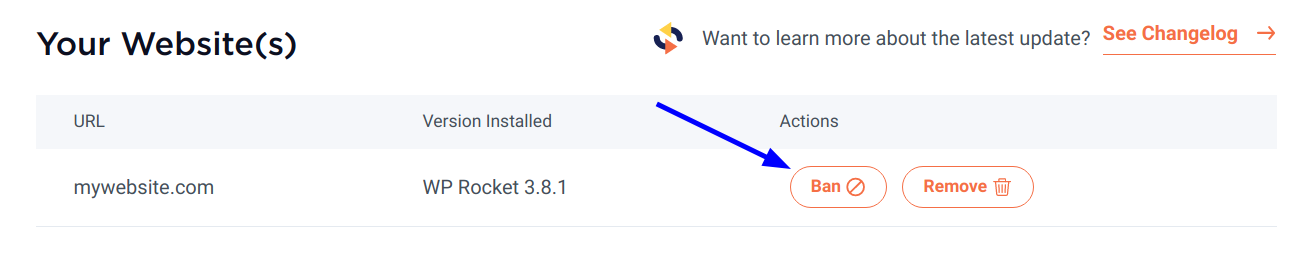
The Ban option will prevent a website from getting access to:
- Updates and updates notifications.
- Technical support.
- WP Rocket cloud features.
Important! This cannot completely stop a site from using WP Rocket as per the GPL license guidelines of WordPress.
The following admin notices will appear in banned websites.
In the license validation page:
WP Rocket There seems to be an issue validating your license. Please see the error message below.
License validation failed. This website is revoked.
Please see this guide for more info.
In the posts page:
WP Rocket Your license has been revoked and your site is no longer optimized for speed.
In the WP Rocket dashboard tab:
Your WP Rocket license has been revoked!
As your license is no longer active, you lost access to WP Rocket's powerful features to boost speed and deliver a top-notch user experience.
At this moment, the banned websites will remain listed in your account, but they will not be counted towards your license.
Alternatively, it's posible to reset the WP Rocket API key. Please contact our Support team for this. This step will require re-installing WP Rocket on your sites.